White-label rank tracker
Your brand on every login, report and email.
Run Nightwatch under your own name. Clients sign in at your domain, see your logo, and get reports and emails from your company, while you track rankings and AI visibility for all of them from one account.
- Your own domain
- HTTPS set up for you
- Unlimited client logins
Trusted by 10,000+ SEO teams
Everything your client sees is yours.
White-label covers the places a client actually touches: the address they type, the screen they log in to, the report in their inbox and the email it arrives in.
Your own domain
Clients sign in at a subdomain you own, such as rankings.youragency.com. One CNAME record pointing to w.nightwatch.io, and we issue the HTTPS certificate.
Your name and logo
Your company name replaces Nightwatch across the app and in the browser tab. Your default logo sits in the header, and the tab shows a neutral favicon.
Branded reports
Choose which of your logos goes on each report, export it as PDF or CSV, and schedule it to send itself daily, weekly or monthly.
Emails from you
Invitations, password resets and scheduled reports go out under your company name and logo. When a client replies, it lands in your inbox.
Client logins
Invite clients with limited access, so each one sees only the site groups you assign. Seats are unlimited, so there is no per-client fee.
Invite-only sign-in
Your domain has no public sign-up form. Accounts come from you, so nobody can find your portal and register on their own.
Set it up on one screen. Your client sees only you.
These are the real screens: the white-label settings in your account, and the sign-in page your clients get on your domain.
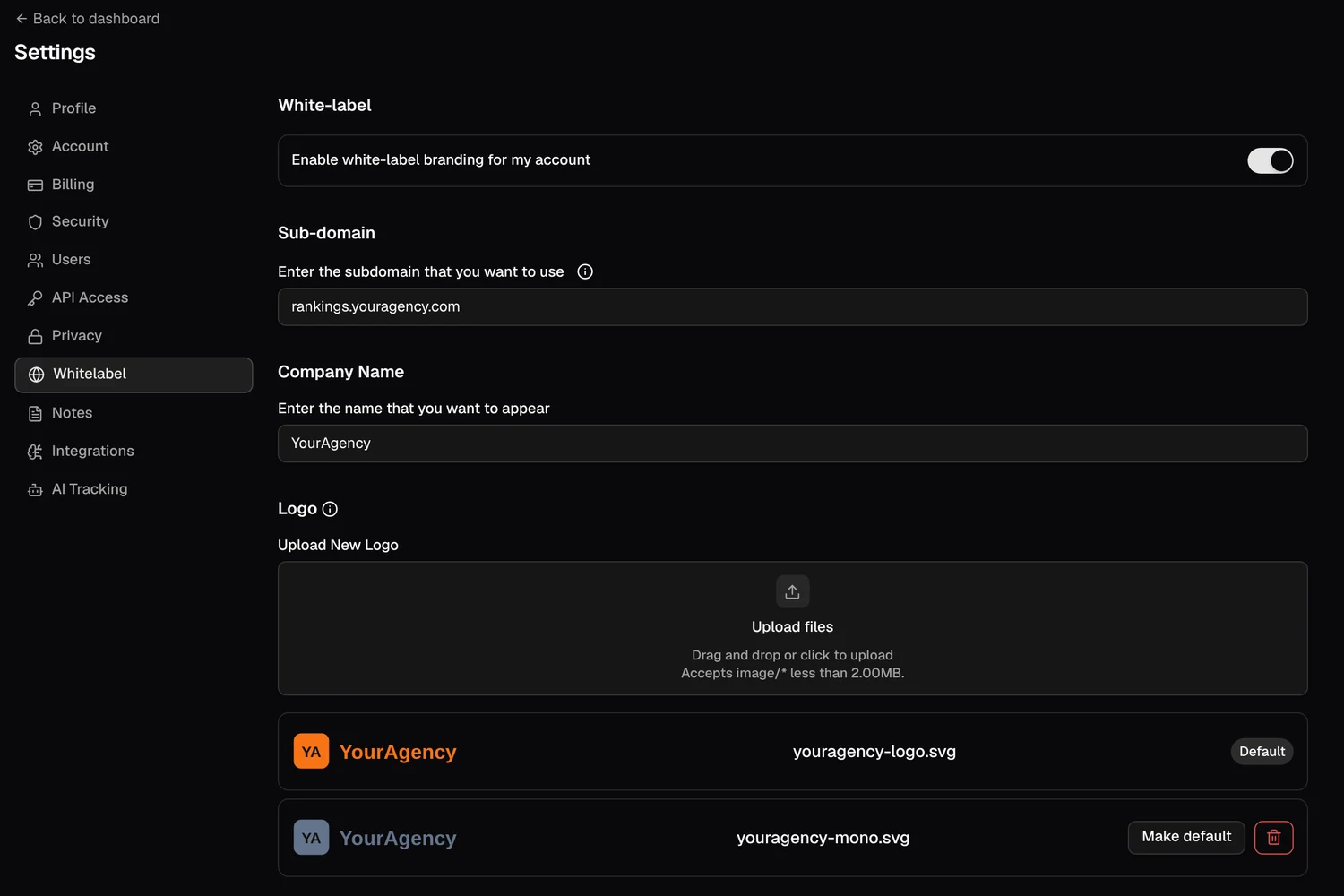
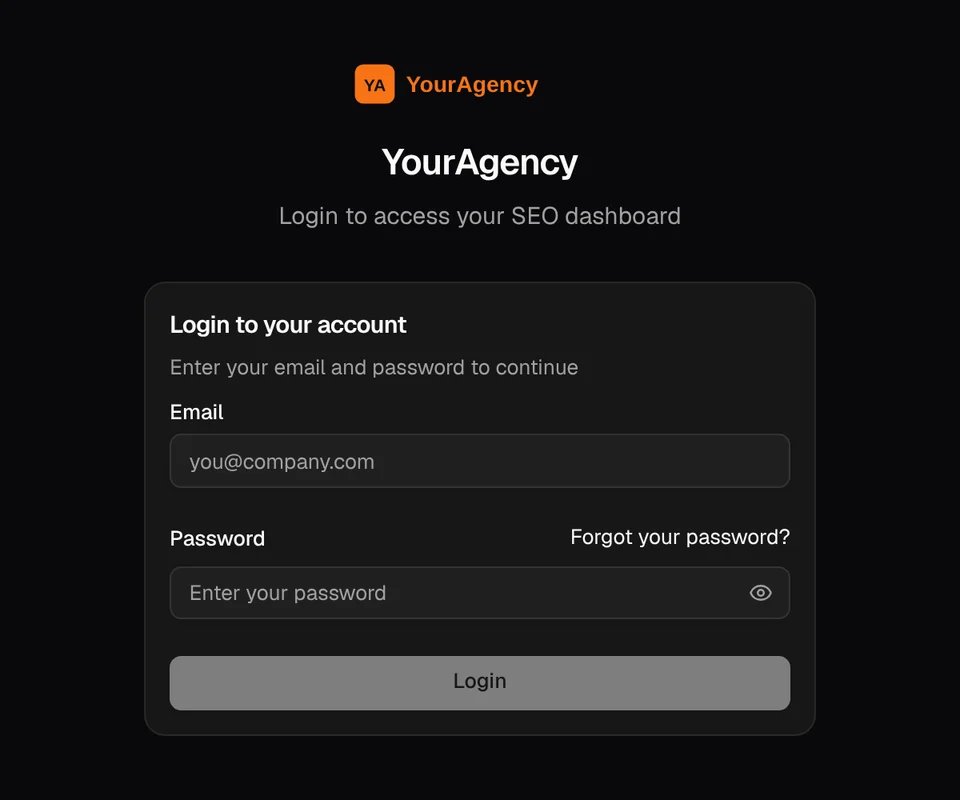
One DNS record puts the platform on your domain.
Pick a subdomain, point it at w.nightwatch.io, and turn white-label on. The first time anyone opens it, we issue the certificate, so it is served over HTTPS from day one.
- Works with any registrar or DNS host that supports CNAME records
- Your company name and logo on the sign-in page and every screen after it
- No public sign-up form on your domain: clients join by invitation
Reports that look like they came from your team.
Upload as many logos as you need. One is the default for the app; any of them can go on a report, so a sub-brand or a co-branded client report is one click away.
- Rankings, traffic and site audit data in one report
- PDF for clients, CSV for the analysts who want raw numbers
- Scheduled daily, weekly or monthly, sent under your company name
Give each client a login that shows only their sites.
Invite a client as a limited user and choose which site groups they can open. You decide whether they can add sites or keywords, and set a cap if they can.
- Unlimited users on every plan, so adding a client costs nothing
- Admins see every client; limited users see only their groups
- Invitations arrive from your company, not from Nightwatch
Built for teams who report to someone else.
If your clients read your SEO reports, white-label keeps the relationship, and the credit, with you.
SEO agencies
Run every client from one account and hand each of them a portal with your name on it.
- One login per client, scoped to their sites
- Weekly reports that send themselves
- Rankings, traffic and site audit in one report
Consultants and freelancers
Look like a bigger shop without building any software. Your clients see your brand, not your tools.
- A professional client portal on your own domain
- Reports under your name, ready for monthly reviews
- No per-seat fees as your client list grows
Resellers and partners
Offer rank tracking as part of your own product or service bundle, under your brand.
- Your domain, logo and company name throughout
- Emails and reports that reply to you
- API access on the same plans for custom workflows
Live on your domain in four steps.
Most of the work is one DNS record. DNS changes usually show up within the hour, though some hosts take longer.
Step 1: Turn on white-label
In your account settings, open the white-label section and switch it on. It's there for account admins on Professional, Agency and Enterprise plans.
Step 2: Point your subdomain
At your DNS host, add a CNAME record for the subdomain you want, pointing to w.nightwatch.io. Enter the same subdomain in Nightwatch.
Step 3: Add your name and logos
Type the company name clients should see and upload your logos. Pick a default for the app; the rest are there for reports.
Step 4: Invite clients and schedule reports
Invite each client with limited access to their site groups, then set up reports to send on the schedule they expect.
As the account owner you keep seeing Nightwatch branding, so support and docs links stay within reach.
White-label FAQ
Plans, domains, branding and client access.
Put your brand on your SEO reporting.
White-label is included on Professional, Agency and Enterprise plans, with unlimited users on all of them. Start free and see the platform your clients will log in to.
Running an agency? See agency features and partner program →